Logitech Spotlight – Product Overview
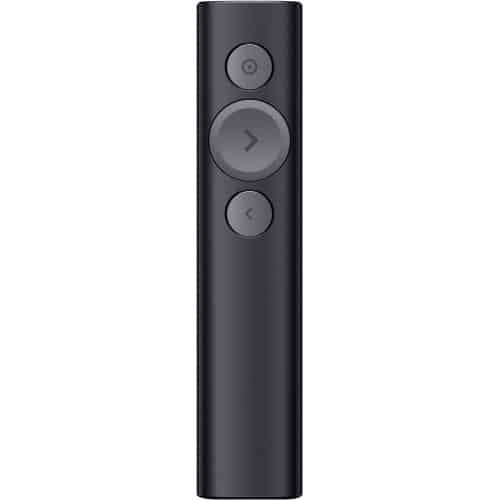
The Logitech Spotlight is designed to transform how presentations are delivered. Instead of a traditional laser dot, it uses a digital pointer system that allows you to highlight, magnify, or pinpoint areas on your screen with precision
Spotlight is a whole new standard in presentation control — specifically designed to keep people engaged. From the boardroom, classroom or living room, you can control your presentation while helping your audience follow what you’re saying whether they’re in-person, virtual, or a hybrid of both.
It also includes mouse-like cursor control, enabling you to interact with content such as videos and links directly from the remote. Combined with smart time management features like vibration alerts, it helps presenters stay on track and deliver confidently.
Logitech Spotlight – Price in Kenya
| Product |
Price (KSh) |
| Logitech Spotlight Presentation Remote |
15,500 – 21,500 |
Logitech Spotlight – Key Specifications
| Specification |
Details |
| Brand |
Logitech |
| Model |
Spotlight |
| Connectivity |
Bluetooth + USB receiver |
| Wireless Range |
Up to 30m |
| Battery |
Rechargeable |
| Pointer Type |
Digital (highlight/magnify/laser) |
| Compatibility |
Windows, macOS |
| Use Case |
Presentations, meetings |
TAKE YOUR PRESENTATIONS TO THE NEXT LEVEL
Spotlight is a whole new standard in presentation control — specifically designed to keep people engaged. From the boardroom, classroom or living room, you can control your presentation while helping your audience follow what you’re saying whether they’re in-person, virtual, or a hybrid of both.
ILLUMINATE EVERY POINT YOU MAKE
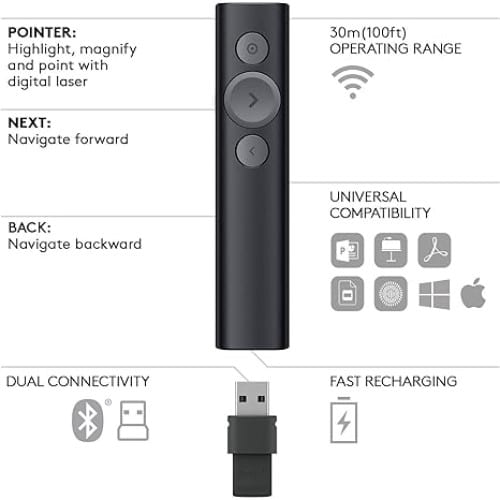
Spotlight has three advanced pointing modes3Enabled via Logitech Presentation App that work on various presentation environments: projectors, TV screens, video conferencing and setups with multiple screens. Highlight creates a spotlight-effect on screen. Magnify zooms-in on details. And Digital Laser precisely pinpoints information.
INTUITIVE SLIDE NAVIGATION
Enjoy focus and instant familiarity with Spotlight’s intuitive three-button interface.
LONG OPERATING RANGE
Move and present freely from as far as 100 ft (30 m) away.
TWO WAYS TO CONNECT
Plug-and-play Spotlight instantly on any compatible computer via USB receiver, or connect with Bluetooth® low energy wireless technology. Spotlight also keeps your computer connected and awake while you’re present.
FAST RECHARGING
Use the included USB-C charging cable and get 3 hours of presenting after a 1-minute charge. Spotlight fully charges in as little as 60 minutes. The device will vibrate and the battery indicator glows red when it’s time to recharge.
SOFTWARE & CUSTOM CONTROLS
Choose from a range of custom controls to suit each presentation. Use the app to configure Spotlight’s highlighting features, button functions, gesture controls, volume adjustment, and more.
SMART TIME MANAGEMENT
Use the app to set an on-screen timer that begins as you click your first slide. You can also configure multiple timing milestones that send vibration alerts directly to Spotlight, so you stay in command until your final slide.
Logitech Spotlight – Performance
- Precise on-screen highlighting and magnification
- Smooth slide navigation with minimal lag
- Stable wireless connection over long distances
- Effective in both physical and virtual presentations
- Reliable performance in conference rooms and classrooms
Logitech Spotlight – Design & Build
- Sleek and minimalist premium design
- Lightweight and comfortable to hold
- 3-button layout for easy control
- Durable build for professional use
- Compact and travel-friendly
Logitech Spotlight – Connectivity
- Bluetooth Low Energy wireless connection
- 2.4GHz wireless via USB receiver
- Dual connectivity for flexibility
- Plug-and-play setup
- Stable connection up to 30 meters
Logitech Spotlight – Use Cases
- Business presentations
- Corporate meetings
- Teaching and training sessions
- Conferences and seminars
- Virtual presentations (Zoom, Teams, etc.)
Logitech Spotlight – Pros and Cons
| Pros |
Cons |
| Advanced digital pointer system |
Requires software for full features |
| Dual connectivity (Bluetooth + USB) |
Premium price |
| Long wireless range |
Limited physical buttons |
| Smart time management alerts |
No built-in storage for presentations |
| Rechargeable battery |
Learning curve for new users |
Logitech Spotlight – FAQs
What makes it different from a normal presenter?
It uses a digital pointer that can highlight and magnify content instead of just a laser dot.
Can it work without software?
Yes, basic functions work, but advanced features require the Logitech app.
What is the range?
Up to 30 meters, depending on the environment.
Is it compatible with Mac and Windows?
Yes, it works with both operating systems and major presentation apps.
Logitech Spotlight – Conclusion
The Logitech Spotlight Presentation Remote is a powerful and modern presentation tool designed for professionals who want more control and engagement during presentations. With its advanced pointer system, dual connectivity, and smart features, it stands out as one of the best presentation remotes available in Kenya.